
Good evening!
First off… it’s the 12th of July, I’m sorry I’m late.
I haven’t written a blog post in a couple of weeks, mostly because I’ve just been incredibly busy and doing almost sweet FA on development lol. I probably should have written one last week, but I hadn’t actually finished the tutorial I wanted to cover yet. Rather than writing about half-finished work, I figured I’d wait until I had something worthwhile to show.
I’m going to split this blog post into two sections:
- Development Progress
- Real Life Updates
Development Progress
Inventory System Complete
Over the last two weeks I’ve finally finished the inventory system tutorial series from @MichaelGamesOfficial on Youtube.
The inventory system was split into three parts:
- Inventory foundations (covered in my previous blog)
- Picking up and using items
- Saving and loading inventory data
The second video was around 50 minutes long, while the third was only about 20 minutes, so once I finally got through the first one the second felt much easier.
Picking Up & Using Items
With the inventory data in place, the next step was creating a way for the player to actually collect items from the world.
Item Pickup
To do this, we created a generic Item Pickup scene. Rather than making separate scenes for apples, potions, keys, and every collectible in the game, everything uses the same pickup scene. The only thing that changes is the ItemData resource assigned to it, which determines what item the player receives.
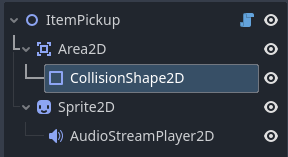
The pickup script begins by grabbing references to the important nodes within the scene, such as the collision area, sprite, and audio player. It also has an exported ItemData variable, allowing us to choose which item this pickup represents directly from the editor.
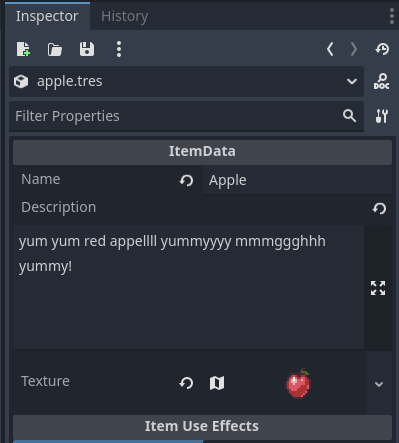
When the scene loads, the sprite is automatically updated using the texture stored inside the assigned ItemData resource. This means swapping an item from an apple to a potion is as simple as changing the assigned resource- the script handles the rest automatically.
The pickup itself works by listening for the player entering its collision area. Once the player enters, the script checks that an item has been assigned before attempting to add it to the player’s inventory.
If the item is successfully added, the pickup sequence begins.
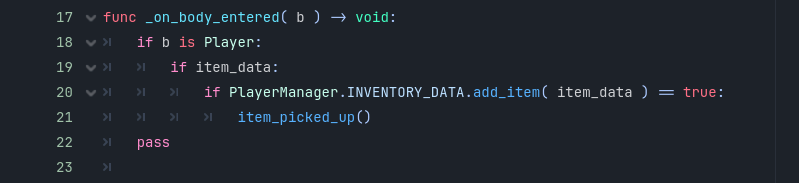
The pickup sequence is fairly straightforward. First, the collision signal is disconnected so the player can’t trigger the pickup multiple times. The pickup sound then plays, the item is hidden from the world, and after the sound finishes, the node is safely removed using queue_free().
This small delay makes the interaction feel much nicer than instantly deleting the object, as the player still gets the audio feedback before the pickup disappears completely.
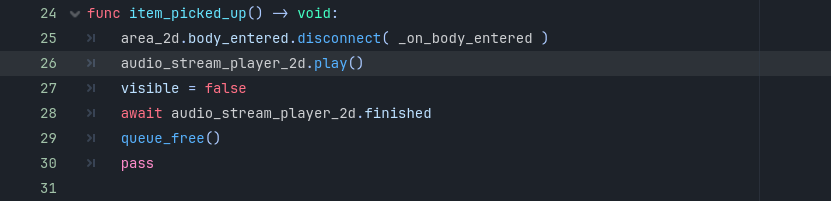
Overall, I really like how reusable this system is. Every collectible in the game can use exactly the same scene and script, with the only difference being the ItemData resource that’s assigned. It keeps the pickup logic completely separate from the item’s behaviour, which we’ll build on in the next section when we introduce Item Effects.
Item Effects
Each usable item has its own Item Effect script attached to it. The example I implemented was a healing effect for both a potion and an apple.
The script references the player’s health component, restores whatever value is set in the item’s Resource file, and plays a sound effect when the item is used.
Overall, it’s actually a really elegant system. Simple and effective!
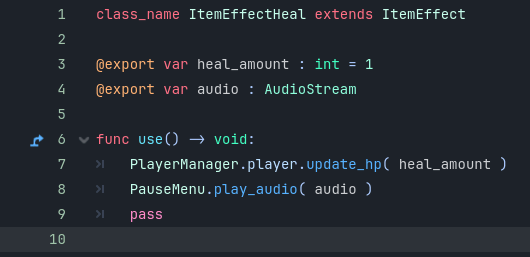
How Item Effects Work
Rather than hard-coding every item’s behaviour individually, we started by creating a base ItemEffect Resource.
The idea behind this is that ItemEffect doesn’t actually do anything on its own. Instead, it acts as a foundation that every future item effect will build from.
The base resource contains two things:
- A description.
- A generic
use()function.
Every item effect in the game will inherit these, but what actually happens inside the use() function depends entirely on the effect being used.
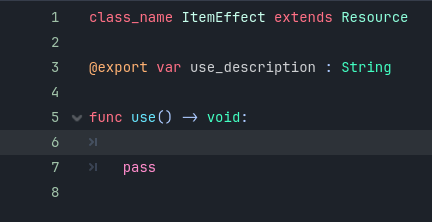
From there we created our first real implementation: ItemEffectHeal.
Rather than extending the standard Resource class directly, ItemEffectHeal extends ItemEffect, meaning it automatically inherits everything from the base class while adding its own healing-specific behaviour.
For this effect we introduced two new variables:
heal(Integer) – How much health the item restores.sound(AudioStream) – The sound effect played when the item is consumed.
The use() function is then overridden so that, instead of doing nothing, it restores the player’s health using the heal value before playing the assigned sound effect.
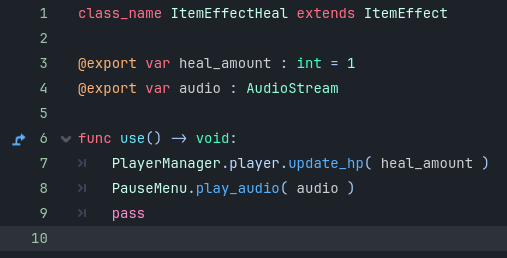
Once the effect itself was working, we updated the ItemData resource.
Under a new export category called Item Use Effects, we added an exported array called effects. This allows every item to hold one or more ItemEffects.
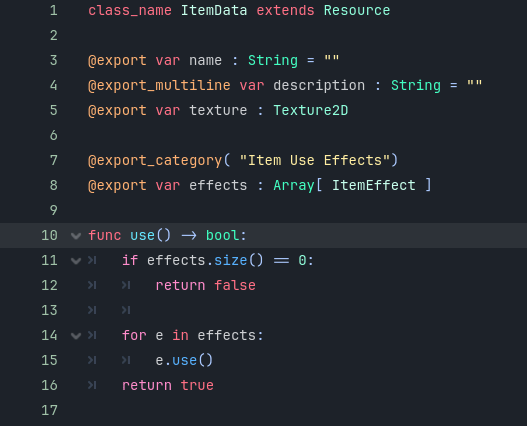
When an item is used, the game first checks whether the array contains any effects at all. If the array is empty, the function simply returns false, meaning the item can’t be used. Otherwise, it loops through every effect stored in the array and executes each one’s use() function.
This design makes the system incredibly flexible. A potion might only contain a single healing effect today, but later on an item could heal the player, apply a temporary buff, play multiple sounds, or trigger several different effects all from the same array.
Finally, back in the individual item resources- such as the Potion or Apple- we simply assign an ItemEffectHeal resource to the effects array, choose how much health it restores, and assign the sound effect we want to play.
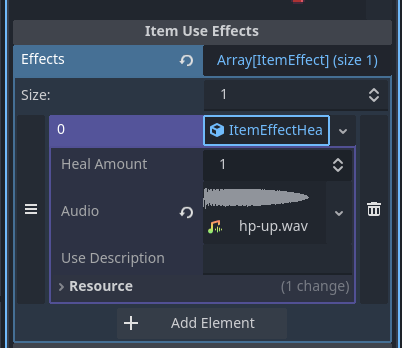
Overall, it’s a surprisingly clean system that should make adding new consumable items much easier in the future.
Adding Items to the Inventory
One of the core functions we implemented was add_item(), which handles what happens whenever the player picks up an item.
The function takes two pieces of information: the item being collected and how many of that item should be added. By default, it assumes you’re only picking up one item at a time, but the system is already flexible enough to support larger quantities later on if needed.
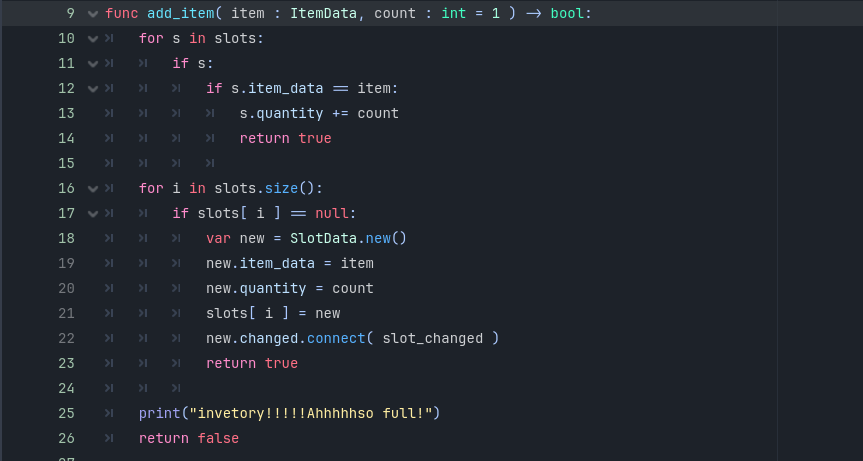
The first thing the function does is search through every inventory slot to see if the player already has that item.
If it finds a matching item, it simply increases that slot’s quantity by however many items were collected and immediately returns true to let the rest of the game know the pickup was successful.
This means duplicate items are stacked together instead of taking up additional inventory slots.
If no existing stack is found, the function then searches the inventory again—this time looking for the first empty slot.
When it finds one, it creates a brand-new SlotData, assigns the item and its quantity, places it into the inventory, and connects the slot to the inventory’s update signal so the UI can react whenever that slot changes.
Once everything has been set up, the function again returns true.
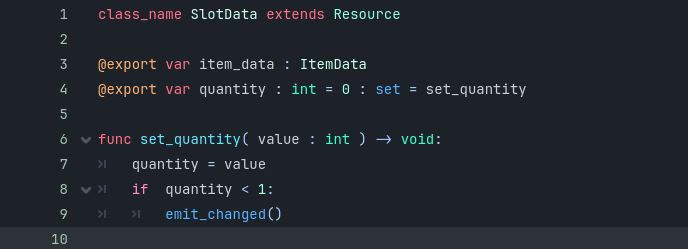
Finally, if the function reaches the end without finding either an existing stack or an empty slot, it means the inventory is completely full.
In that case, a debug message is printed to the console and the function returns false.
This is particularly useful because other systems- such as the Item Pickup script- can simply ask whether adding the item succeeded. If the function returns false, the pickup can stay in the world instead of disappearing, making the inventory system responsible for deciding whether an item can actually be collected.
Overall, it’s a simple function, but it handles three important scenarios:
- Stacking an item that already exists.
- Creating a new stack in an empty slot.
- Preventing pickups when the inventory is full.
Quick Side Note
I have tried really hard to go into more detail here about the code- please let me know if that’s something you enjoy reading or if you want me to keep it more high level!
Using Items
The next step was actually allowing items to be consumed.
Using an item now:
- Applies its effect
- Removes one item from the inventory
- Updates the UI
I did actually run into a bug here 😡
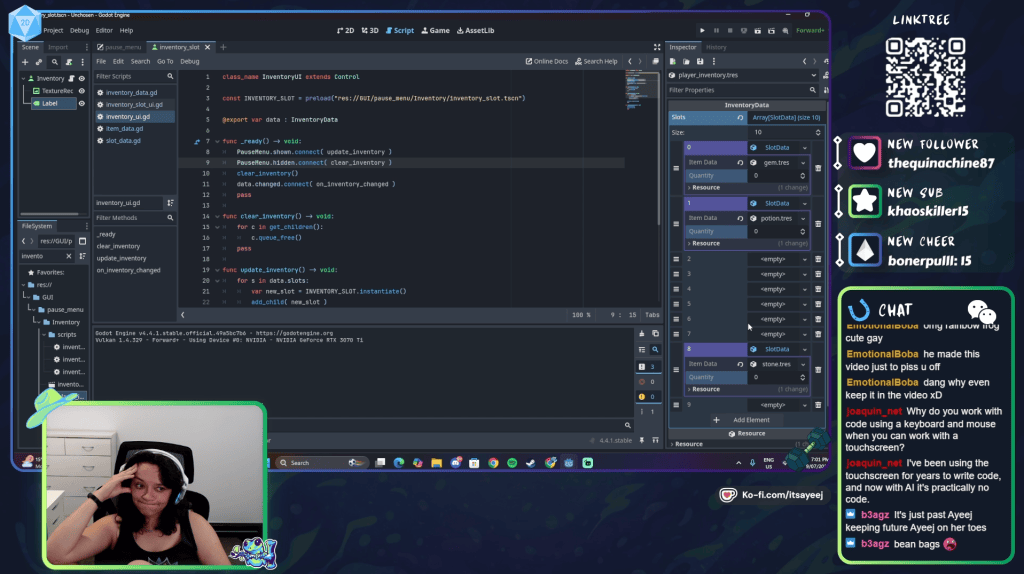
The issue ended up being caused by placeholder values I had manually entered in the editor while testing. Because those values weren’t matching what the inventory was actually storing, the item count wasn’t depleting correctly.
I eventually tracked it down, but I still have one strange UI issue where the inventory scales oddly whenever items are added or removed.
I’m not entirely sure what’s causing that yet, but that’s a problem for future me.
Honestly though…I was just happy to finally get through this tutorial because it took so much longer than I expected.
Saving & Loading Inventory
The final part of the inventory tutorial focused on making sure everything we’d built could actually be saved and loaded between play sessions.
Compared to the previous episode, this one was much more straightforward. Rather than introducing new systems, it mostly involved extending the existing save system so it also included the player’s inventory.
Gathering the Save Data
The save process begins with the get_save_data() function.
Its job is simply to loop through every inventory slot and convert each one into a format that can be written to the save file. Rather than trying to save the inventory all at once, it asks each slot to prepare its own save data before adding it to an array.
Once every slot has been processed, the completed array is returned to the game’s save system.
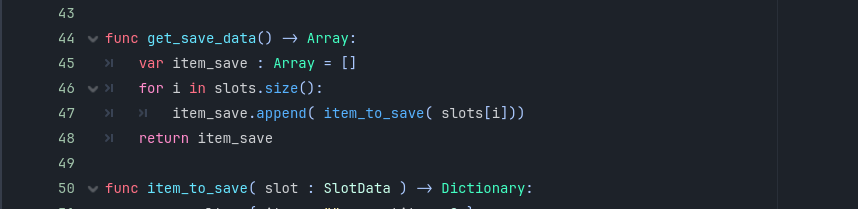
Saving Individual Items
The item_to_save() function is responsible for converting each inventory slot into a format that can actually be stored.
For every occupied slot, it saves two pieces of information:
- The item’s resource path.
- The quantity of that item.
If a slot is empty, it simply stores an empty value instead. This keeps the save data lightweight while still preserving the exact layout of the player’s inventory.
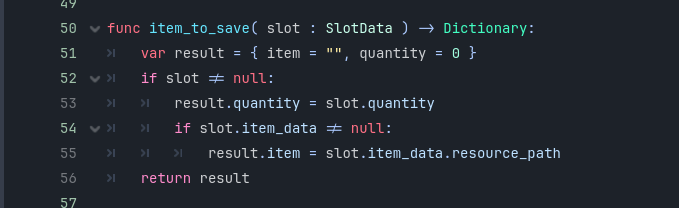
Loading the Inventory
Loading works in the opposite direction.
When a save file is loaded, the existing inventory is first cleared before being resized back to the correct number of slots. The saved inventory data is then looped through, rebuilding each slot one by one.
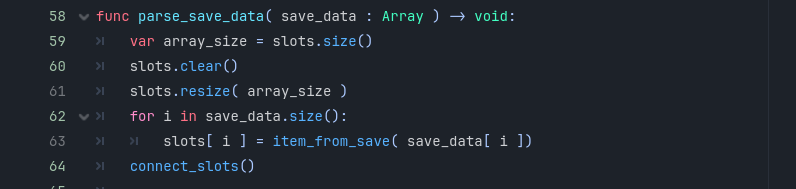
The item_from_save() function recreates each individual inventory slot.
If the saved slot is empty, it simply returns null. Otherwise, it creates a new SlotData object, loads the correct ItemData resource using the saved resource path, restores the saved quantity, and places it back into the inventory.
Once every slot has been recreated, the inventory reconnects all of its signals so the UI updates correctly.
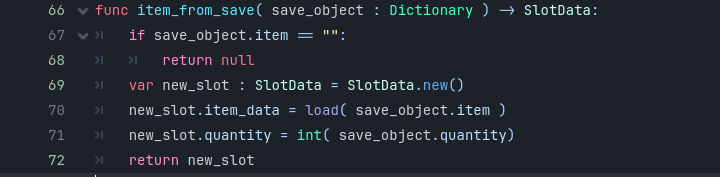
What I particularly like about this approach is that the game isn’t trying to save the entire item object. Instead, it only stores the path to the item’s resource and the quantity owned. When the game loads, those resources are recreated from the project itself, keeping the save file small while ensuring every item is restored exactly as it was designed.
Overall Thoughts
Looking back, this was actually a productive couple of weeks.
Last week didn’t feel productive because I didn’t even finish the first tutorial, but that’s mainly because I’ve started sticking much more closely to my time limits.
Now that my schedule is mapped out, I only dedicate around four hours to game development at a time.
I’ve realised that:
- On stream I average about 1 hour of work for every 10 minutes of tutorial.
- Off stream I average around 30–40 minutes for every 10 minutes.
Part of me really wanted to finish this particular tutorial off-stream because I knew it would go significantly faster.
But I also enjoy bringing people along for the process, so we stuck with it.
Two videos finished is still two videos finished.
Next Episode
Next up is Enemy Item Drops.
My prediction is that it’ll work something like this:
- Enemy HP reaches zero.
- Spawn an item instance.
- That item references the same Item Pickup scene.
- The player walks over it.
- Inventory handles the rest.
Whether that’s actually how the tutorial approaches it… we’ll find out. It’s only about half an hour long, so I’m hoping it’ll be a much quicker one.
Other Development (Or Lack Of)
Outside of the inventory work…
I didn’t create any new sprites. I didn’t work on audio. I also didn’t make any progress on the GDD.
That’s unfortunate, because I was hoping to have more time at the beginning of July, but life has been absolutely packed.
The last week of June alone included:
- Work in the office
- Vet appointments
- Open homes
- Financial advisor meetings
- Parkrun
- Horse commitments
- D&D
…and plenty more.
Sometimes there just aren’t enough hours in the week.
Real Life Updates
New Life Schedule
One of the biggest things I’ve done recently is completely redesign my weekly schedule.
Not just my stream schedule…
My entire life schedule.
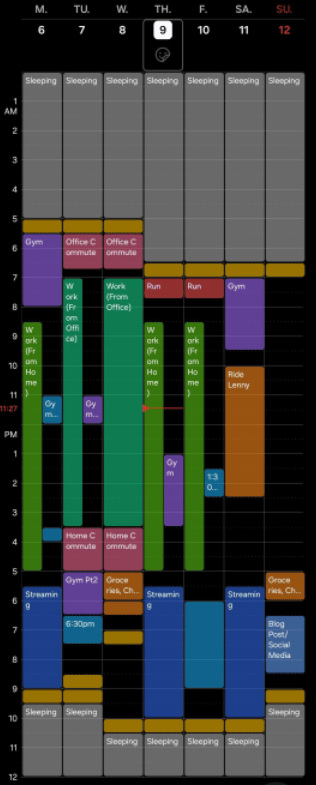
It honestly took around three hours just to map everything out, but now every day has dedicated blocks for work, gym, streaming, game development and recovery.
Hopefully it’ll help me stay consistent over the long term.
July Fitness Challenge
I’ve also started a challenge for the month of July.
My goals are:
- 10,000 steps every day
- Gym 4 times per week
- One run per week
- 30 minutes of sunlight every day
- No screens while eating
- At least 7 hours sleep
- Five daily affirmations
- 100% nutrition compliance
…plus a couple more that I’m probably forgetting.
So far things are going really well.
House Sale
We also received an offer on the house!
Our agent is seeing whether they can negotiate a little more money first, but if they can’t we’ll likely accept the current offer anyway.
Nothing is guaranteed until contracts are signed- buyers pull out all the time- but things are looking promising.
Hopefully everything goes smoothly.
Stream Schedule
The stream schedule has also changed.
The new weekly schedule is now:
- 🎮 Monday – Games
- 🛠 Thursday – Game Development
- 🛠 Friday – Game Development
- 🎲 Every second Saturday – Wildcard Night
Wildcard Night has been really fun because my Discord community gets to vote on what we do.
This weekend they chose Dead by Daylight, which ended up being a great stream. I also got to raid someone who had only streamed once before, which was really cool.
Lenny Update
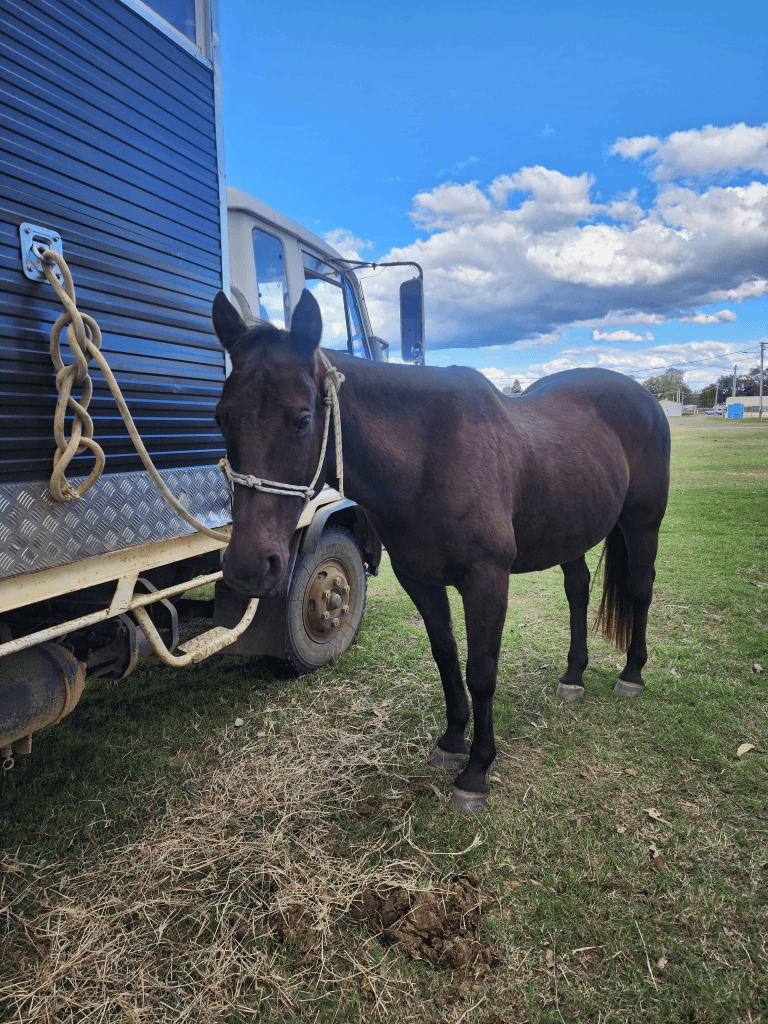
Lenny threw me off a few weeks ago and honestly beat me up pretty badly.
The bruises on my legs were awful. So so so bad.
I think I mentioned it in my previous blog, but thankfully I’m mostly healed now. The only thing that’s still hanging around is the strain in my groin. It’s definitely still there, but it’s improving every week! Gym is back to…I wanna say 90% effort?
But hey! We had a little club day today- he was a star. A lazy star, but a star.
PAX & Cosplay
Everything for PAX is finally coming together.
Flights are booked. Hotel is booked. Leave has been approved.
I’ve also commissioned two different people:
- One for the wig
- One for the cosplay itself
Both have assured me everything will be finished before my deadline, so fingers crossed!
Moving
Next weekend I’ll finally be moving all the big furniture.
Tables. Beds. Chairs. Fridge. Washing Machine. Dog
The whole lot. It’s going to be a long day, but it’ll be nice to finally get everything moved. We can finally host inspections and open homes without having to clean for 2 hours beforehand each time!
Gertie
Poor Gertie is heading back to the vet again because her ears are still causing problems.
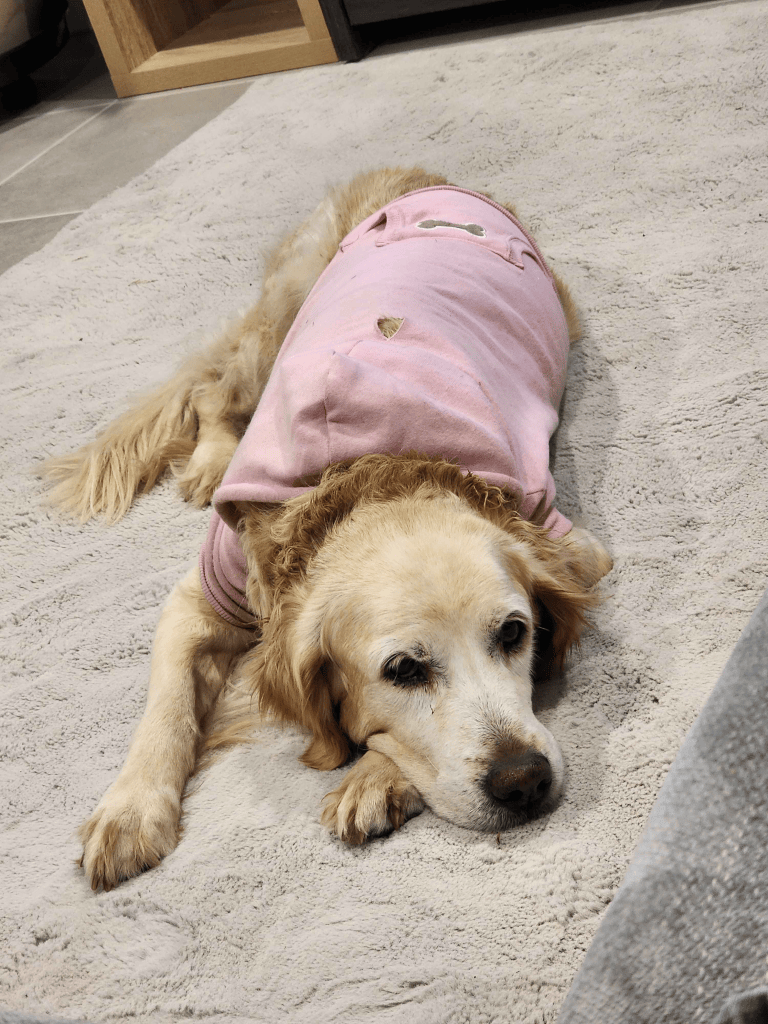
Hopefully we can finally figure out what’s going on.
Stream Overlay Refresh
While I didn’t get around to creating any new game art this fortnight, I did spend some time refreshing my Twitch overlays.
Originally, I was planning on commissioning an artist to create absolutely everything. I’ve still decided to do that for my Starting Soon, BRB, and Stream Ending screens, but after playing around in Canva I decided to have a go at creating my own gameplay overlay.
After a lot of experimenting with layouts, colours, and different themes, I finally landed on something that I’m really happy with. I also posted several iterations to my community and gathered feedback along the way, which helped shape the final design.
I think it’s a much cleaner layout than what I was using previously. It gives the gameplay significantly more room on screen while still leaving space for my camera, alerts, and other stream elements without feeling cluttered.
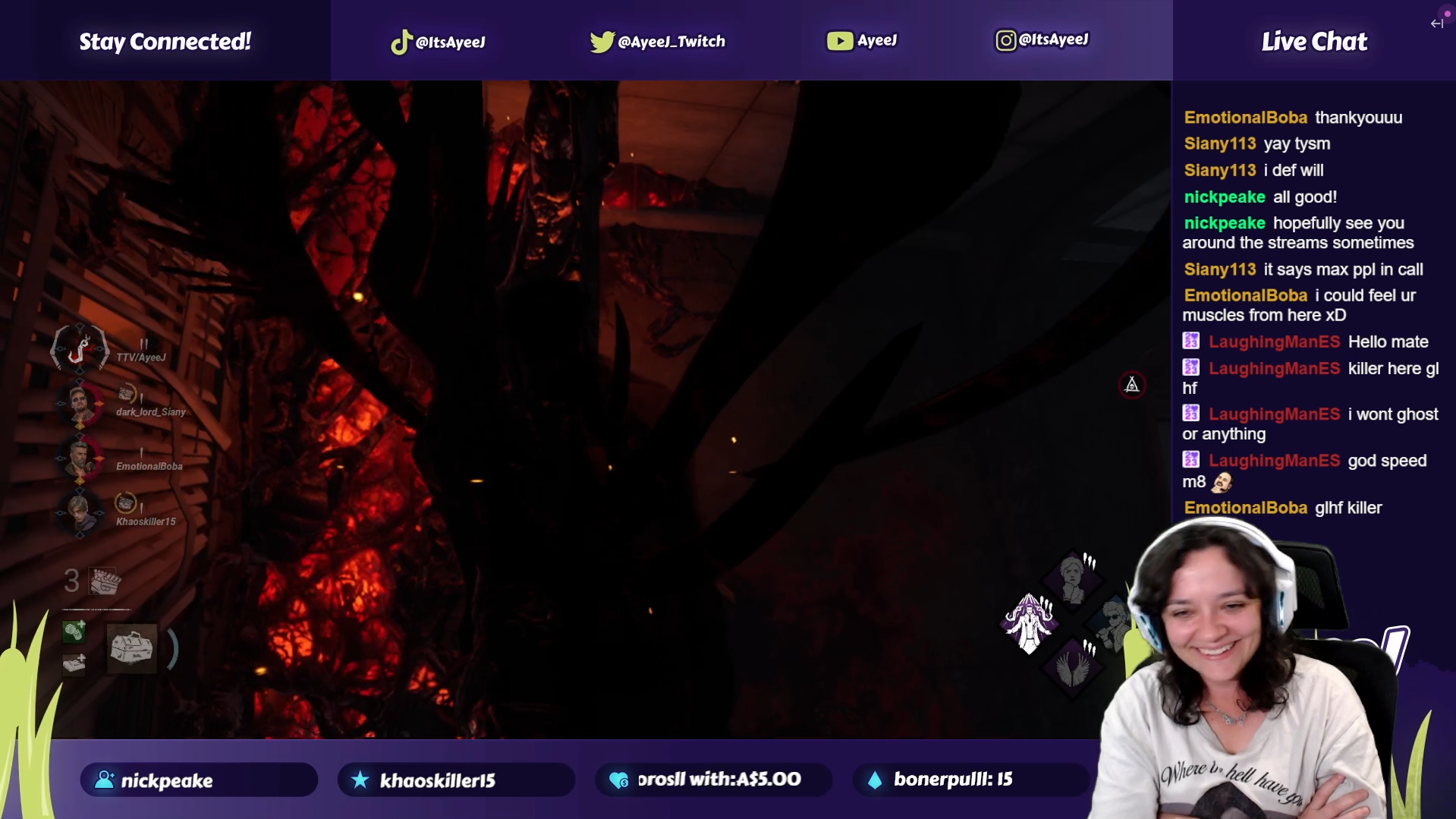
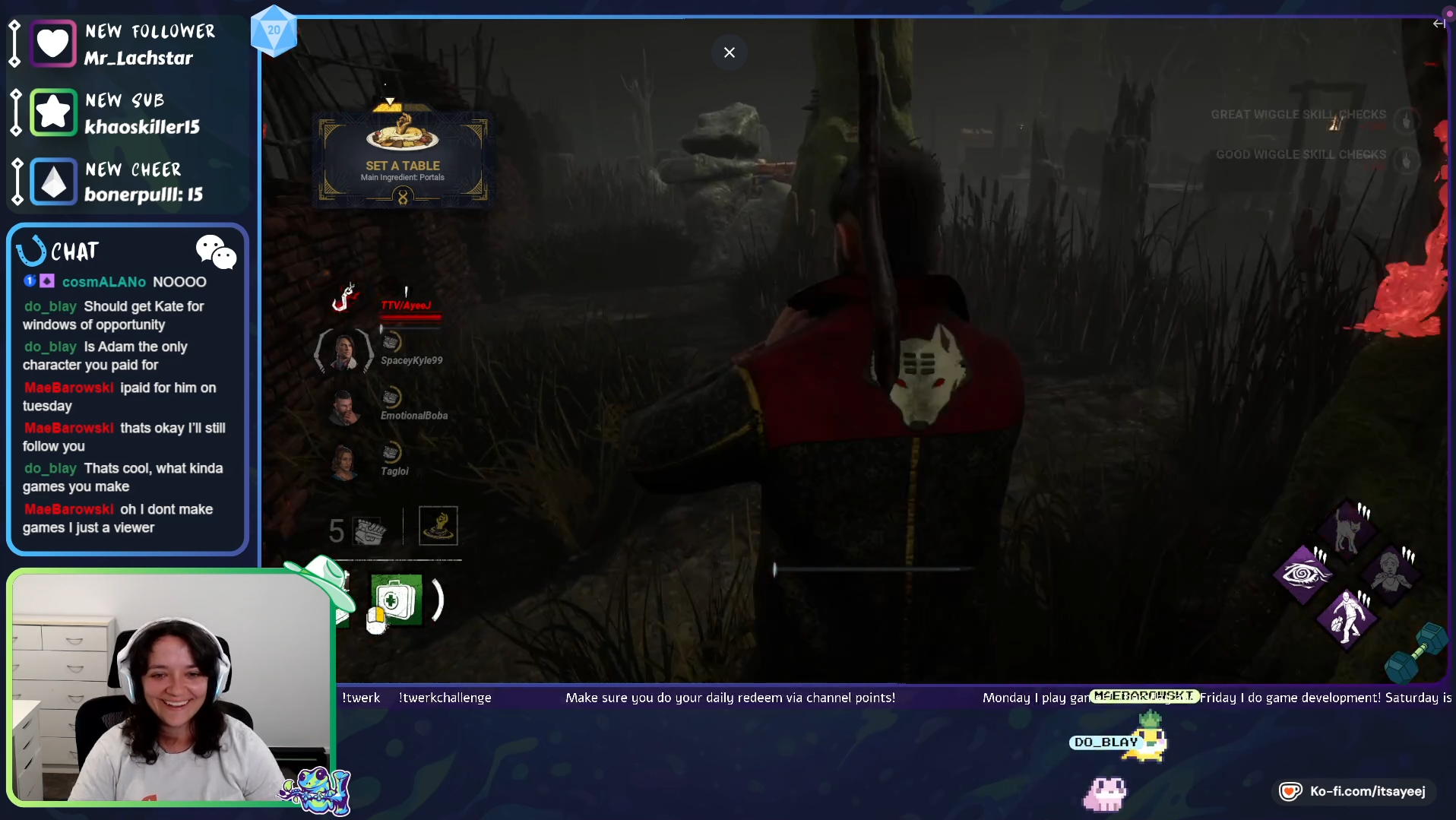
I’m really happy with how it turned out, and it was nice to work on something creative outside of Godot for a change. It’ll also be interesting to compare it against the commissioned artwork once that’s finished and see how well everything ties together visually.
Overall, life has been incredibly busy lately, but despite that I still managed to finish the inventory system and keep making progress.
Sometimes progress isn’t flashy. Sometimes it’s just showing up consistently, getting through the work, and moving one step closer to the game you want to build.
See you in the next devlog.


Leave a Reply