Welcome to the 2nd of August! First of all… where is this year going? I swear it feels like I blinked and we’re already in August.
Secondly, I owe you all an apology for missing last week’s dev log. I didn’t feel like I’d made enough progress to justify writing an entire post, so I decided to wait until I’d finished another tutorial episode. That meant there was a little more to talk about this week, and I think it was the right call.
Despite my updated weekly schedule making game development a little harder to fit in, I managed to finish Episode 20 of the tutorial, so we’re officially into the twenties now! I was originally planning to stream this weekend as well, but I ended up spending Sunday with my family instead, and before I knew it the weekend had disappeared.
As always, we’ll start with the development updates before moving on to some life and streaming updates.
Enemy Item Drops
The first feature I worked on was enemy item drops. Looking back, this system was actually pretty straightforward to implement, but it’s one of those small features that makes the game feel so much more rewarding to play.
Before we got into the new feature itself, the tutorial started with a few bug fixes. I won’t talk about those here, but once they were out of the way we started creating the loot system.
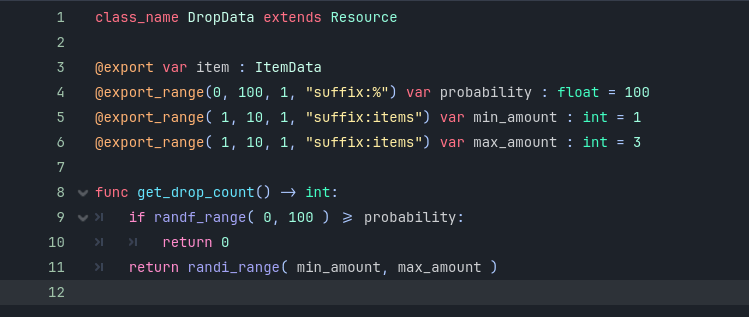
The first thing we added was a DropData script. This script is responsible for storing all of the information about what an enemy can drop when it’s defeated, how many of each item it can drop, and the probability of each item appearing.
This acts as a blueprint for enemy loot, storing information such as what item can drop, the chance of it dropping, and the minimum and maximum quantity that can appear. When an enemy is defeated, it simply asks its assigned DropData resource how many of that item should be spawned, making the entire loot system easy to customise through the Godot editor without changing any code.
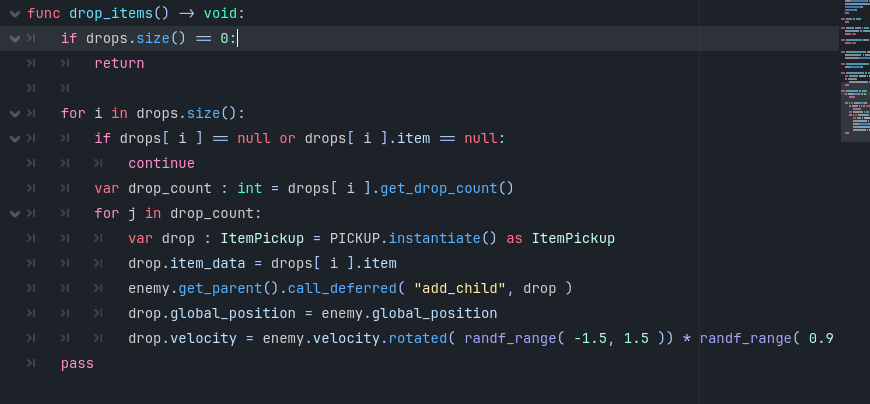
Once the DropData resource was created, we updated the enemy’s existing Destroy State to use it.
When an enemy dies, it now checks whether it has any configured drops, asks each DropData resource how many items should be spawned, and creates those item pickups in the world. Each item is also given a small amount of random velocity so it pops out of the enemy rather than simply appearing on the ground, making the loot feel much more satisfying to collect.
One of the things I really liked about this system is that almost all of the balancing happens inside the Godot editor rather than in code. We can now configure exactly what an enemy drops, how many of that item can appear, and the chance of each item dropping.
For example, one enemy could have a 50% chance to drop an Apple, while only having a 10% chance to drop a Potion. Changing those values later doesn’t require touching the code at all, which is going to make balancing much easier as the game grows.
It’s actually been a couple of weeks since I finished this episode, so I don’t remember every little implementation detail anymore. Thankfully, it wasn’t an overly complicated system, but it definitely adds another layer of polish to the game.
Treasure Chests
The second feature I worked on was treasure chests, which was Episode 20 of the tutorial.
Like the loot system, this wasn’t complicated, but it brought together several different systems that we’ve already built.
The chest acts as a solid object that the player can’t walk through, but it also contains an interaction area. When the player enters that area, the chest begins listening for the interaction input. If the player presses the interaction button, the chest opens, plays its animation, and spawns the item that’s been configured for that chest.
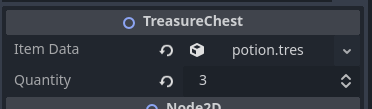
Just like the enemy loot system, everything is configurable through the editor, so each individual chest can contain different rewards without needing additional code.
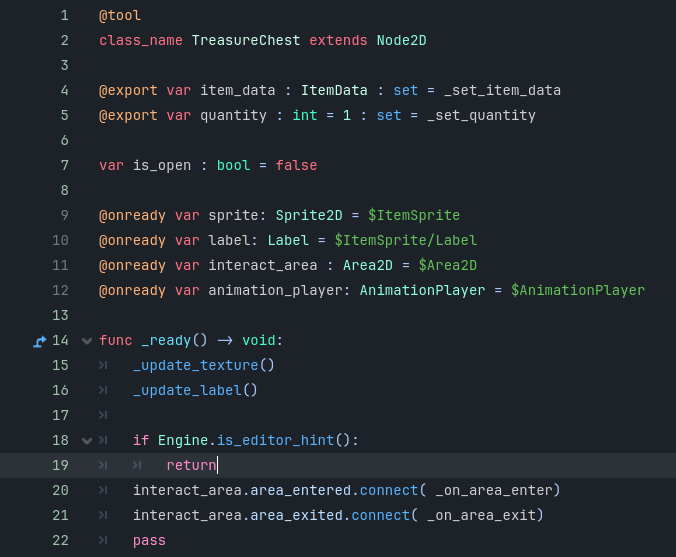
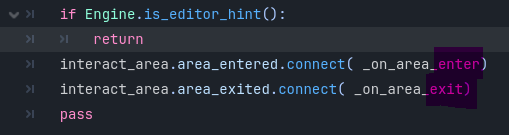
The first part of the treasure chest script sets up everything the chest needs to function. When the scene loads, it also connects the interaction area signals so the chest knows when the player enters or leaves its range.
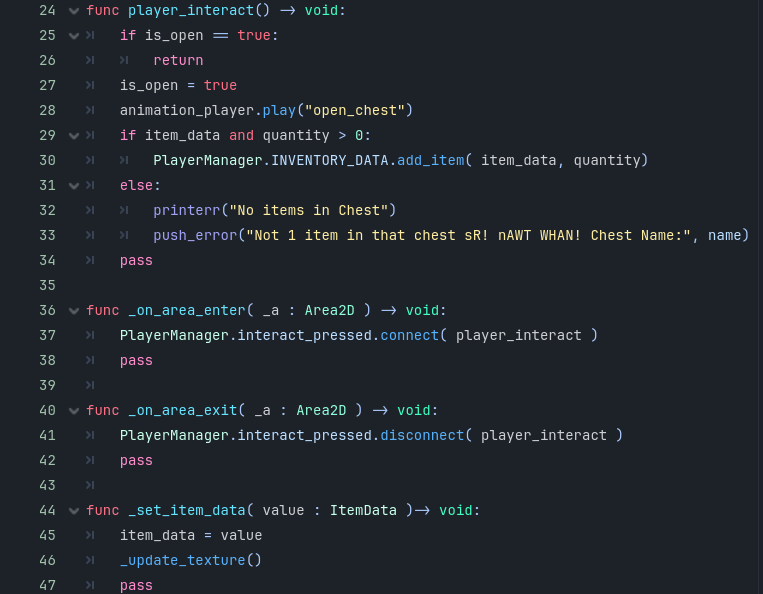
This section handles the player’s interaction with the chest. When the player presses the interact button, the script first checks whether the chest has already been opened. If it hasn’t, the opening animation plays, the configured item is added to the player’s inventory, and the chest is marked as opened so it can’t be looted again. This is also where the interaction signal is connected when the player enters the chest’s range and disconnected when they leave, ensuring the player can only interact with nearby chests.
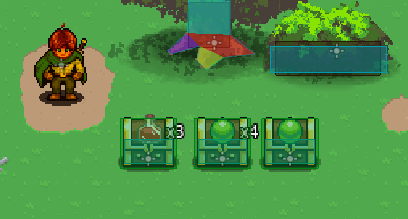
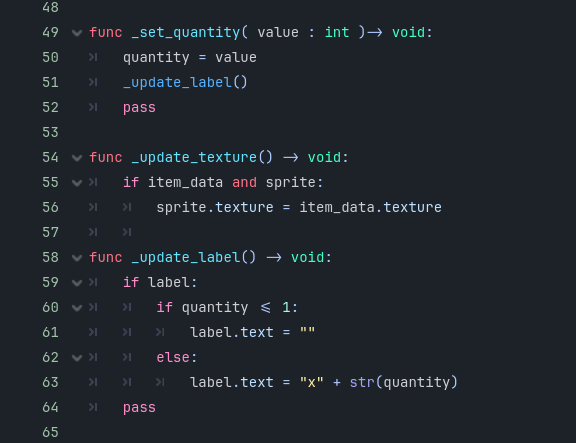
The final section keeps the chest’s appearance up to date inside the editor. Whenever the item or quantity is changed, the chest automatically updates its icon and the quantity label, allowing me to preview exactly what each chest contains without needing to run the game. This makes placing and configuring treasure chests throughout the world much quicker and less error-prone.
This is what it looks like in the editor!
Of course… it wouldn’t be one of my development sessions without running into a bug somewhere. This one ended up being completely my fault.
I accidentally copied part of the code incorrectly. The interaction system was supposed to connect a signal when the player entered the interaction area, and then disconnect that signal again when they left.
Unfortunately, I copied the enter signal…and both said _on_area_enter.
That one missing piece completely broke the interaction system and left me wondering why nothing was behaving properly anymore.
After spending far longer than I’d like trying to figure it out, I eventually found the answer in the YouTube comments. I don’t think I’ve ever been so grateful for someone asking the exact same question I had.
Looking Ahead
One thing I’ve been thinking about a lot lately is that I finally feel like I’m getting to a point where I can start branching away from the tutorial.
Don’t get me wrong, I’m absolutely going to keep following it. There’s still a lot to learn, and I know it’ll continue teaching me better ways to structure systems and solve problems.
But for the first time, I feel like I have enough of a foundation to start experimenting on my own.
For example, we already have a Player Stunned state. With what I’ve learnt so far, I think I could start creating some of the other player states myself. I could also start building more enemy types, create additional items for players to find, and begin populating treasure chests before enemies eventually start dropping those items as well.
Instead of just following along with the tutorial, I can actually begin building out what the first area of Unchosen is going to look like.
I was actually planning to do exactly that last Friday during my Game Dev stream. I sat down, got everything ready…
…and I just couldn’t do it.
I didn’t have the energy to stream, so I ended up cancelling it, and I didn’t end up doing any game development over the weekend either.
Life Update
I’ll keep this section a little shorter this month.
August is shaping up to be a very busy month. I’ve increased my training to five gym sessions every week, while also trying to hit 12,000 steps every single day. It’s definitely achievable, but I’m feeling the effects. Recovery has been pretty rough and I’m just tired most of the time, but I’m trying to stick with it.
On the streaming side, Wildcard Sundays are now officially replacing Wildcard Saturdays. For anyone who hasn’t joined one before, Wildcard is the stream where everyone in the Discord votes on what we’ll play.
The change was mainly because my Saturdays are absolutely packed this month. I’ve got a third birthday, an eighteenth birthday, and three separate horse events, so there just wasn’t enough consistency to keep streaming on Saturdays.
Outside of that, things are moving in the right direction. Lenny is doing well, my dog’s ear infections finally seem to be under control, and the house should hopefully settle next week.
I think that once the house is settled it’ll feel like a massive weight has been lifted off my shoulders. There’s just been so much happening lately that it’s hard not to feel overwhelmed by it all.
Work has also been incredibly busy. I even had to sit one of my certification exams at 9:30 PM one evening, which definitely wasn’t ideal, but thankfully I passed and now have the certification I needed.
If I’m being completely honest though, I’ve been struggling lately.
I’m trying really hard to stay consistent with two game development sessions every week, one gameplay recording session, streaming, work, the gym, walking every day… and I just feel burnt out.
Even writing this blog post felt difficult.
The funny thing is that writing isn’t actually the hard part. It’s everything that comes afterwards.
It’s editing the post.
It’s grabbing code snippets.
It’s rewatching the tutorial to remember exactly what happened.
It’s making the thumbnail.
It’s uploading everything.
It’s posting it across different platforms.
Individually, none of those jobs are particularly difficult. Together though, they become this massive mental hurdle that makes the whole process feel overwhelming before I’ve even started.
I knew that if I didn’t sit down and write this tonight, I probably wasn’t going to do it at all.
I’m not entirely sure what’s been going on lately. Maybe I’m just tired. Maybe I’m overwhelmed. It’s probably both.
Either way, I’m trying to keep showing up, even if progress is a little slower than I’d like. Hopefully once the house is finally settled, life will calm down a little and I’ll be able to put more energy back into Unchosen again.
As always, thank you so much for reading, and I’ll see you all in the next dev log!



Leave a Reply